In software development, two names dominate the conversation about deploying applications: Kubernetes and Docker. Are they competitors? Are they alternatives to one another? Or are they two sides of the same coin? This confusion is common, yet understanding the distinction is critical for any IT professional or organization aiming to scale their infrastructure efficiently.
Docker revolutionized software packaging by popularizing containers, lightweight, portable units that run consistently across platforms. Kubernetes, on the other hand, emerged as the solution for managing those containers at scale. While Docker helps you create the container, Kubernetes helps you orchestrate thousands of them. In 2026, with over 60% of enterprises using Kubernetes and Docker, which remains the standard for containerization, knowing how these technologies interact is no longer optional; it is a fundamental skill for modern DevOps success.
In this comprehensive guide, we will dismantle the “Kubernetes vs Docker” myth. You will learn exactly what each tool does, the key technical differences between them, and how to leverage both to build robust, scalable applications.
Docker Explained: What Is a Containerization Platform?
Docker is an open-source platform designed to automate the deployment, scaling, and management of applications within containers. Launched in 2013, it democratized container technology, making it accessible to developers worldwide. When people say “Docker,” they are typically referring to Docker Engine, the runtime that allows you to build and run containers, and Docker Hub, a cloud-based service for sharing applications.
What Docker Actually Does
Docker is a toolkit for creating and running containers. It provides a standard way to package your application’s code, configurations, and dependencies into a single object called a Docker Image. This image is immutable; it doesn’t change as it moves from development to testing to production.
Docker solves the classic “it works on my machine” problem. By packaging the environment with the code, Docker ensures consistency. A developer can build a container on a Windows laptop and have it run identically on a Linux server in the cloud.
What are the Key Components of Docker?
Dockerfile: A text document that contains all the commands a user could call on the command line to assemble an image.
Docker Image: A read-only template with instructions for creating a Docker container.
Docker Container: A runnable instance of an image. You can create, start, stop, move, or delete a container using the Docker API or CLI.
Docker Hub: A registry service on the cloud that allows you to download Docker images built by other communities.
Research Insight The Docker container market is estimated to grow from USD 7.41 billion in 2026 to reach USD 19.26 billion by 2031. |
What is Docker’s Role in Development?
For developers, Docker is primarily a workflow tool. It simplifies setting up development environments. Instead of spending days configuring local servers and databases, a developer can simply run a docker-compose up command, and the entire application stack is ready to use. This efficiency is why 64% of developers reported using AI tools alongside Docker in 2024 to speed up coding and configuration workflows.
However, Docker on its own has limitations. While it is excellent for managing individual containers on a single host, it does not natively handle the complexities of managing hundreds of containers across multiple servers. It doesn’t automatically replace a failed container or scale your application based on traffic spikes. That is where orchestration comes in.
What Is Kubernetes? Understanding the Container Orchestration System
Kubernetes, often abbreviated as K8s, is an open-source container orchestration platform originally designed by Google and now maintained by the Cloud Native Computing Foundation (CNCF). If Docker is the shipping container, Kubernetes is the crane, the ship, and the port management system that ensures the containers get where they need to go efficiently and safely.
What Kubernetes Actually Does
Kubernetes manages the lifecycle of containerized applications across a cluster of machines (nodes). It abstracts the underlying hardware, allowing you to deploy applications without worrying about which specific server they land on. Its primary job is to ensure that the actual state of your system matches the desired state you define.
For example, if you tell Kubernetes, “I want 5 instances of my payment service running at all times,” Kubernetes will start 5 containers. If one server crashes and 2 containers die, Kubernetes detects the discrepancy and immediately starts 2 new instances on a healthy server to maintain the desired count of 5.
What are the Core Capabilities of Kubernetes?
Kubernetes offers a robust set of features for enterprise-grade container management:
Service Discovery and Load Balancing: Kubernetes can expose a container using the DNS name or using its own IP address. If traffic to a container is high, Kubernetes can load-balance and distribute network traffic, keeping the deployment stable.
Storage Orchestration: It allows you to automatically mount a storage system of your choice, such as local storage, public cloud providers, and more.
Automated Rollouts and Rollbacks: You can describe the desired state for your deployed containers using Kubernetes, and it can change the actual state to the desired state at a controlled rate. For example, you can automate Kubernetes to create new containers for your deployment, remove existing containers and adopt all their resources to the new container.
Self-healing: Kubernetes restarts containers that fail, replaces containers, kills containers that don’t respond to your user-defined health check, and doesn’t advertise them to clients until they are ready to serve.
What are the Key Differences Between Kubernetes and Docker?
When people compare Kubernetes vs Docker, they are often treating them like competing tools. In reality, they solve different problems at different stages of the container lifecycle. Docker helps you build, package, and run containers, while Kubernetes helps you orchestrate, scale, and manage those containers across multiple machines. A simple way to think about it is this: Docker is the container ship; Kubernetes is the global port logistics network that decides where every ship docks, how traffic flows, and what happens if one port goes down.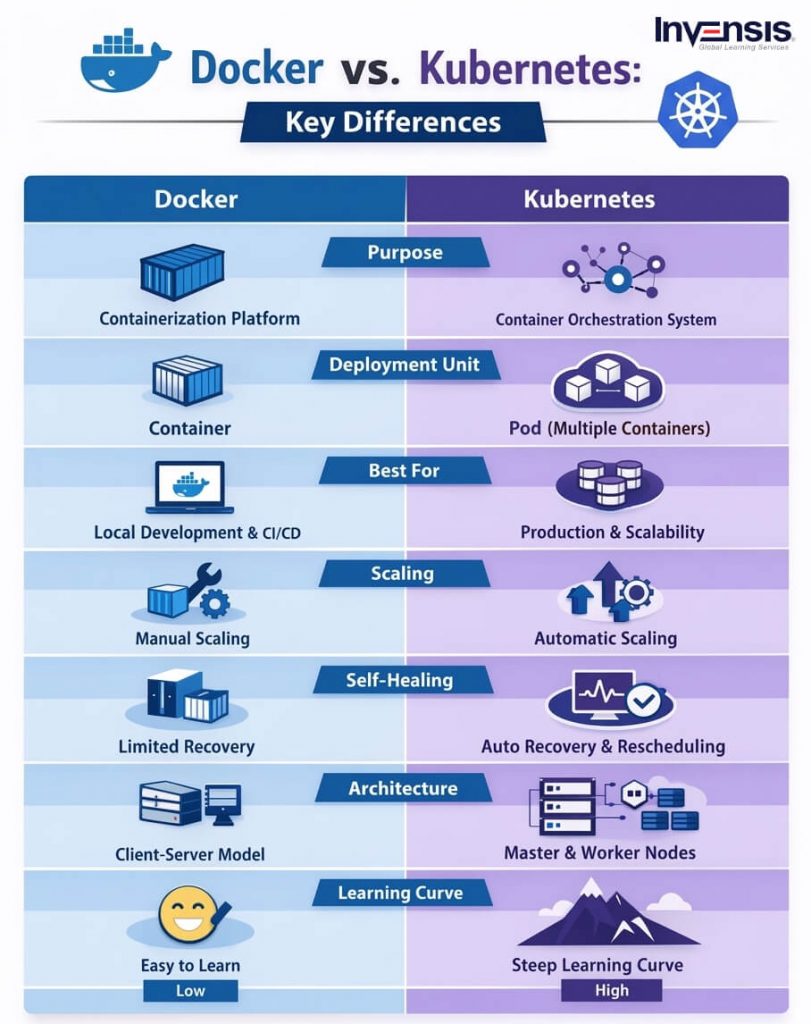
Purpose and Primary Function
The most important difference between Docker and Kubernetes lies in their core purposes. Docker is designed to make applications portable by packaging code, dependencies, libraries, and runtime settings into lightweight, isolated units called containers. This solves one of the biggest development headaches: the classic “it works on my machine” problem. With Docker, the same application package can run consistently on a developer laptop, a test server, or a production environment with minimal changes.
Kubernetes, by contrast, is not mainly about creating containers. Its role begins after containers already exist. Kubernetes is built to schedule, coordinate, monitor, and maintain containers at scale. If your application includes many services running across multiple servers, Kubernetes helps ensure the right containers run in the right place, receive traffic correctly, and stay available even when infrastructure fails. In short, Docker answers “How do I package and run this app?”, while Kubernetes answers “How do I keep hundreds of containers running reliably in production?”
Aspect | Docker | Kubernetes |
Primary Purpose | Packages code, dependencies, libraries, and runtime settings into lightweight containers. | Manages and orchestrates containers across multiple servers. |
Core Problem Solved | Eliminates the classic “works on my machine” issue by ensuring consistent runtime environments. | Ensures containers run reliably at scale in production environments. |
Role in the Lifecycle | Focuses on building and running containers. | Focuses on scheduling, monitoring, and scaling containers. |
Developer Experience | 9/10 | 9/10 |
Best Use Case | Local development, CI/CD pipelines, and environment consistency | Production orchestration and multi-server deployments |
Scope and Scale
Docker typically works best at the container level or on a single host. You can use it to run one container, several related containers, or a lightweight multi-container app using Docker Compose. That makes Docker ideal for local development, testing, demos, and small deployments where infrastructure complexity is limited. It gives teams speed, repeatability, and a clean packaging format without requiring the overhead of cluster management.
Kubernetes operates at a much broader level. It is built for clusters of machines, not just one server. Instead of focusing on one container at a time, Kubernetes manages collections of containers across worker nodes and keeps the whole system aligned with a desired state. This is what makes Kubernetes so valuable for microservices-based applications, enterprise workloads, and large-scale production systems. As application complexity grows, teams need more than container packaging; they need orchestration, placement decisions, health checks, and cross-node coordination. That is the gap Kubernetes fills.
Aspect | Docker | Kubernetes |
Deployment Scope | Works best at the container level or on a single host. | Built to manage containers across clusters of multiple machines. |
Scaling Capability | Supports small-to-medium multi-container applications, often with Docker Compose. | Designed for enterprise-scale workloads, elastic infrastructure, and large microservices environments. |
Ideal Environment | Best suited for local development, testing, demos, and smaller deployments. | Best suited for production systems, distributed applications, and complex infrastructure. |
Scale Ceiling | 4/10 | 10/10 |
Best Fit | Single server and lightweight multi-container apps. | Enterprise scale, worker-node clusters, and high-availability deployments. |
Architecture and Deployment Model
Docker uses a relatively straightforward client-server architecture. The Docker client sends commands, the Docker daemon does the heavy lifting, and registries such as Docker Hub store images for distribution. Developers define images in a Dockerfile, build them, and run containers from those images. This workflow is one reason Docker remains so developer-friendly: it is simple enough to learn quickly, yet powerful enough to support modern CI/CD pipelines.
Kubernetes has a more sophisticated architecture because it is solving a larger operational problem. A Kubernetes cluster contains a control plane and one or more worker nodes. The control plane includes components such as the API server, scheduler, controller manager, and etcd, while each node runs components like kubelet, kube-proxy, and a container runtime. Kubernetes also introduces concepts such as Pods, Services, and Deployments. This architecture gives teams much greater control and automation, but it also explains why Kubernetes has a steeper learning curve than Docker.
Another important distinction is the unit of deployment. In Docker, you usually think in terms of individual containers. In Kubernetes, the smallest deployable unit is usually a Pod, which can contain one or more tightly related containers. That difference matters because Kubernetes is designed to manage applications as distributed systems, not just as isolated processes.
Aspect | Docker | Kubernetes |
Architecture Model | Uses a simple client-server model with the Docker client, Docker daemon, and container registry. | Uses a distributed architecture with a control plane and worker nodes managing cluster operations. |
Core Components | Relies on Dockerfiles, images, containers, and registries such as Docker Hub. | Relies on the API server, scheduler, controller manager, etcd, kubelet, and kube-proxy. |
Deployment Unit | Deploys individual containers. | Deploys Pods, which can contain one or more tightly related containers. |
Learning Curve | Easier to learn and adopt for developers and smaller teams. | Steeper learning curve due to its broader architecture and resource model. |
Simplicity Score | 8/10 | 3/10 |
Best Fit | Fast container builds, local workflows, and straightforward CI/CD pipelines. | Advanced orchestration, service management, and large-scale production deployments. |
Scaling Capabilities
Docker can scale applications, but scaling is usually more manual or limited in scope. For smaller environments, that may be perfectly fine. If your app has a handful of services and traffic is predictable, Docker and Docker Compose may be all you need. Docker lets teams spin up and down containers quickly, which is useful for development and test workflows.
Kubernetes, however, is built with scaling as a core capability. It can place workloads across nodes based on available resources, replicate Pods, and automatically adjust deployment size based on system conditions or demand. It is designed to handle scenarios where traffic spikes, services fail, or new versions must be rolled out without disruption. This makes Kubernetes especially attractive for organizations that need elastic infrastructure, high availability, and production-grade resilience.
Aspect | Docker | Kubernetes |
Scaling Approach | Supports scaling, but it is usually more manual and limited in scope. | Treats scaling as a core capability across cluster environments. |
Automation Level | Requires more hands-on effort to increase or reduce container instances. | Automatically adjusts workloads based on demand and available resources. |
Traffic Handling | Works well when traffic is stable and service complexity is low. | Handles traffic spikes, service failures, and rolling updates with minimal disruption. |
Resource Distribution | Typically operates within a single host or smaller environment. | Distributes workloads across nodes based on cluster resource availability. |
Best Use Case | Development, testing, and smaller deployments with predictable load. | Elastic infrastructure, high availability, and production-grade resilience. |
Scaling Power | 4/10 | 10/10 |
Deployment Style | Manual scaling for dev and test workflows. | Automatic, demand-based scaling at cluster scale. |
Self-Healing and Reliability
One of Kubernetes’ biggest advantages over Docker is its self-healing behavior. Docker can run containers efficiently, but by itself it does not provide the same level of automated recovery across a distributed environment. If a container crashes or a server fails, recovery often requires additional tooling or manual intervention.
Kubernetes constantly compares the current state of the system to the desired state defined by the team. If a Pod becomes unhealthy, Kubernetes can restart it. If a node goes down, Kubernetes can reschedule workloads elsewhere. It can also keep services unavailable until they are actually ready to accept traffic. This operational model is one reason Kubernetes is widely used for mission-critical applications where uptime, failover, and resilience are non-negotiable.
Aspect | Docker | Kubernetes |
Failure Recovery | Runs containers efficiently, but does not provide built-in recovery across distributed environments. | Continuously compares actual state with desired state and corrects failures automatically. |
Container Health Response | A crashed container usually needs manual restart or added external tooling. | Unhealthy Pods are restarted automatically without manual intervention. |
Node Failure Handling | Does not natively reschedule workloads if a server goes down. | Reschedules workloads to healthy nodes when a node fails. |
Traffic Readiness | Does not natively control traffic based on application readiness across clusters. | Keeps services out of traffic until workloads are ready to accept requests. |
Auto-Recovery Score | 3/10 | 9/10 |
On Failure | Manual restart or custom tooling required. | Auto-restart, rescheduling, and traffic cutover handled automatically. |
Networking and Load Balancing
Docker provides basic networking features and can connect containers together on a host, which is enough for many smaller applications. It can also support multi-container communication patterns through Compose and user-defined networks. For development and moderate deployments, this is often sufficient.
Kubernetes goes much further by offering service discovery, cluster networking, and load balancing as native orchestration features. It can route traffic to healthy Pods, expose services consistently even when containers move between nodes, and manage communication inside a distributed cluster. This becomes crucial when applications are split into many microservices that must discover and talk to each other reliably. In practical terms, Docker helps containers run; Kubernetes helps distributed applications behave like a stable system.
Aspect | Docker | Kubernetes |
Networking Scope | Provides basic networking mainly within a single host environment. | Provides cluster-wide networking across multiple nodes and services. |
Service Communication | Supports container communication through Docker Compose and user-defined networks. | Supports service discovery so microservices can find and communicate reliably. |
Load Balancing | Offers limited built-in load balancing for smaller deployments. | Includes native load balancing to route traffic to healthy Pods automatically. |
Traffic Stability | Works well for development and moderate deployments with simpler networking needs. | Maintains stable service access even when containers move between nodes. |
Advanced Features | Supports host networking, bridge mode, and Compose networks. | Supports ingress, cross-node DNS, service mesh, and built-in load balancing. |
Network Capability Score | 5/10 | 9/10 |
Flexibility, Runtime Support, and Learning Curve
Another reason the Kubernetes vs Docker debate can be misleading is that Kubernetes is not tied to Docker alone. Kubernetes supports multiple container runtimes, including containerd and CRI-O, which means Docker is not a strict requirement for running Kubernetes workloads. This reinforces the idea that Kubernetes sits at a higher orchestration layer, while Docker is one way to build and work with containers.
That said, Docker is usually easier to learn first. Its commands are more direct, its workflow is more intuitive for developers, and the feedback loop is faster. Kubernetes offers far more power, but that power comes with YAML files, cluster concepts, networking rules, and operational responsibilities that can overwhelm smaller teams. So the better question is often not “Which one is better?” but “At what stage does my application need orchestration?” For many teams, the progression is natural: start with Docker for packaging and local development, then adopt Kubernetes when scale, resilience, and operational complexity demand it.
Aspect | Docker | Kubernetes |
Ease of Adoption | Commands are direct, workflows are intuitive, and the feedback loop is fast. | Setup involves YAML manifests, cluster concepts, policies, and operational complexity. |
Learning Curve | Developers can usually become productive within a few hours. | Teams often need days or weeks to become confident in production use. |
Entry Point | Often serves as the standard starting point for containerization. | Better suited once teams outgrow basic container management and need orchestration. |
Operational Complexity | Simpler to run and manage in smaller environments. | Requires deeper knowledge of networking, RBAC, scheduling, and cluster operations. |
Ease of Getting Started | 9/10 | 3/10 |
Ramp-Up Time | Hours to first running container. | Days to weeks for a production-ready cluster. |
So, what is the real difference? Docker is a containerization tool focused on building and running containers efficiently. Kubernetes is an orchestration platform focused on managing containers across infrastructure at scale. Docker gives you consistency and portability. Kubernetes gives you coordination, recovery, scaling, and control. For modern DevOps teams, they are often not rivals at all, they are two layers of the same cloud-native workflow.
AVOID THIS MISTAKE Assuming you always need Kubernetes. Many teams rush to adopt Kubernetes because it’s trendy. If you are running a simple monolithic application or a small set of microservices with low traffic, the complexity of managing a Kubernetes cluster (the “K8s tax”) might outweigh the benefits. Start with Docker or Docker Swarm, and migrate to Kubernetes only when your complexity demands it. |
When to Use Docker vs Kubernetes?
Choosing between Docker (standalone) and Kubernetes depends entirely on your project’s scale and complexity. It is not always an “either/or” choice, but rather a “when” choice.
Use Docker When
You are in the Development Phase: For local development, Docker is unbeatable. It allows developers to spin up environments quickly without overhead.
You have a Simple Application: If your app fits on a single server and doesn’t require complex auto-scaling, Docker Compose is sufficient and much easier to maintain.
You have a Small Team: Managing Kubernetes requires specialized knowledge. If you lack a dedicated DevOps engineer, the learning curve of K8s might slow you down.
You are Prototyping: When validating an idea (MVP), speed is key. Docker gets you up and running instantly.
Use Kubernetes When
You need High Availability: If downtime translates to significant revenue loss, Kubernetes’ self-healing and multi-node architecture are essential.
You are running Microservices at Scale: Managing 50+ microservices manually is impossible. Kubernetes orchestrates the complexity of service-to-service communication.
You need Hybrid or Multi-Cloud Deployment: Kubernetes provides a consistent abstraction layer. You can move workloads from AWS to Azure or on-premise data centers with minimal friction.
You need Advanced Deployment Strategies: Kubernetes natively supports Canary deployments and Blue/Green deployments, allowing you to test new features with a small subset of users before a full rollout.
How Docker and Kubernetes Work Together?
Ideally, you shouldn’t view this as a competition but as a partnership. In a modern DevOps pipeline, Docker and Kubernetes are complementary technologies that work together to deliver software.
The Integrated Workflow
Build (Docker): Developers write code and use Docker to package the application into a container image. This happens on their local machine.
Ship (Registry): The Docker image is pushed to a container registry (like Docker Hub, Amazon ECR, or Google Container Registry).
Run (Kubernetes): Kubernetes pulls the image from the registry and deploys it to the cluster.
It is important to note that Kubernetes has deprecated DockerShim, the bridge that allowed it to use Docker Engine as a runtime. However, this does not mean Kubernetes can’t run Docker-built images. Kubernetes now uses runtimes like containerd or CRI-O that are compliant with the Container Runtime Interface (CRI). Since Docker images follow the OCI (Open Container Initiative) standard, they run perfectly fine on these runtimes.
So, you will likely continue to use Docker commands to build your images (docker build), but Kubernetes will use a lighter-weight runtime to execute them in production. This change actually improves performance and security by removing unnecessary Docker Engine features from the production environment.
PRO TIP Master Docker first. You cannot effectively manage Kubernetes without a solid understanding of container fundamentals. Learn how to write efficient Dockerfiles, manage layers, and optimize image sizes before you try to orchestrate them with K8s. |
Conclusion
The comparison between Kubernetes and Docker is often misunderstood as a competition, when in reality, they solve different problems within the same cloud-native ecosystem. Docker focuses on packaging and running applications in portable containers, ensuring consistency across development and production environments. Kubernetes builds on top of that foundation by orchestrating containers at scale, enabling automated deployment, scaling, self-healing, and high availability across clusters. For organizations adopting microservices architectures or building resilient DevOps pipelines, understanding how these technologies complement each other is essential for building scalable, reliable infrastructure.
For professionals looking to strengthen their expertise in cloud-native development and DevOps practices, gaining hands-on experience with containerization and orchestration tools is a critical step. Edstellar offers specialized DevOps training programs designed to help IT professionals understand container architecture, deployment strategies, cluster management, and real-world DevOps workflows. These courses equip teams with the practical skills required to build, deploy, and manage modern applications efficiently in today’s cloud-driven environments.
Frequently Asked Questions
1. Can I use Kubernetes without Docker?
Yes. Kubernetes supports any container runtime that complies with the Container Runtime Interface (CRI). While Docker was the default for a long time, modern Kubernetes clusters often use lightweight runtimes like containerd or CRI-O. However, you will likely still use Docker tools to build your images.
2. Is Docker Swarm dead?
Not dead, but definitely niche. With only ~5% market share compared to Kubernetes’ 90%+, Docker Swarm is maintained for existing users and specific simple use cases. For enterprise adoption and long-term career growth, Kubernetes is the far superior choice.
3. Which is easier to learn, Docker or Kubernetes?
Docker is significantly easier to learn. You can grasp the basics of running a container in an afternoon. Kubernetes has a steep learning curve due to its complex architecture, new terminology (Pods, Deployments, Services), and configuration (YAML files).
4. Do I need to learn Linux to use these tools?
Yes, a basic understanding of Linux is highly recommended. Both Docker and Kubernetes are deeply rooted in Linux kernel features (cgroups, namespaces). While you can run them on Windows or Mac, production environments are almost exclusively Linux-based.
5. Is Kubernetes free?
Yes, Kubernetes itself is open-source and free to download and use. However, running it requires resources (servers/cloud instances). Managed services like AWS EKS or Google GKE charge for the management layer and the compute resources you consume.